Features

Everything Gradifon reads, tests, documents and manages.

From the USB connection to the PDF certificate, then from repair to invoice: every step is built for a counter workstation. Fast, easy to read, and honest when a piece of information isn’t available on a model.

Every tab on video

One tab of the software, one video.

Pick a tab, just like in the Gradifon menu. Videos narrated in French, on a sample shop.

The software in 45 seconds, screen by screen.

What’s new

What has changed in the latest versions.

Newest first. Workstations that are already installed update themselves. The details of each version are on the Download page.

Repairs · 0.31

Several phones, one job sheet

  • A customer drops off several phones: one job sheet groups them, each keeps its own number, status and price
  • A phone can be added to an existing job sheet; the drop-off receipt lists them all with the total
  • Unlock code in a dedicated field: digits, password or Android pattern drawn with the mouse
  • The code stays hidden, appears on no document and is erased when the phone is handed back
Workshop · 0.31 and 0.32

Your own steps

  • Steps attached to the statuses: quote ready, part ordered, part arrived, to call back…
  • Drop-down menu on every job sheet, filter in the repairs list
  • One button adds a full workshop’s steps in one go, editable afterwards
  • Steps ticked “Show to customer” appear in the online tracking on your website, the others stay internal
Labels · 0.31

Repair labels

  • Customer name, reference, device, fault, price and date
  • Barcode or QR code, your choice in Settings
  • The scanner reads the label and opens the job sheet
  • Dymo 11356 and 30321 formats, always printed at the printer’s best quality
Stock · 0.24

A completely reorganized stock

  • Eight color-coded categories: screens, batteries, connectors, cameras, phones, tablets, accessories, other parts
  • Purchase and sale prices, with the margin calculated automatically
  • Filters by brand, model, capacity and quality
  • A product record that adapts to the product type, with the IMEI for a phone
Batches · 0.24

A batch goes into stock in one click

  • Each phone gets its own device record, with its prices, grade and IMEI
  • Blacklisted phones are left out
  • A phone already in stock with the same IMEI isn’t created again
Invoices · 0.24

A tab for your invoices

  • Invoices and credit notes in one place
  • Search by number or by customer
  • PDF duplicate and credit note from the list
iPad · 0.22 and 0.23

iPad, by cable and in the app

  • Recognized by name, with their RAM
  • Wi-Fi model: the record says it has no IMEI, and Find My is still checked
  • Test app for iPad on the App Store, with a touch grid that fits the screen
Shop · 0.19 and 0.20

Emails and first start-up

  • Emails to customers in your shop’s name: certificate, repair ready, signed drop-off receipt
  • Log of the latest emails in Settings, with the reason for any failure
  • Start-up wizard in six steps for a new shop, which you can run again from Settings
Loyalty · 0.18

Credit earned on delivery

  • Rule of your choice: “€X credit for every €Y of delivered repairs”
  • Credit added when the repair becomes “Delivered”, taken back if its status changes
  • With no rule saved, nothing changes
Workshop · 0.18

Faster to fill in

  • Models suggested by brand, with their release year
  • Jobs suggested by fault, added in one click
  • Part qualities set up by your shop (Soft OLED, Hard OLED, Incell…)
  • Refreshed workshop: one color per status, “For N days”, customers as cards
Diagnostic · 0.17

More precise on Android

  • One test per rear lens: main, wide-angle, telephoto
  • Charging port validated automatically when the app was installed through the PC cable and the phone charges
  • Link lost during setup: advice to try another cable or another port
iPhone · 0.15

Restore an iPhone on a Mac

  • An “unavailable” iPhone with a forgotten passcode starts again at “Hello”, fully erased, with the customer’s consent
  • Nothing is bypassed: if Find My was on, the owner’s Apple Account is still required
  • Setup in one go: activation, language, Wi-Fi, setup screens
USB reading

The device record fills itself in.

As soon as it detects the phone, Gradifon queries it over USB and shows what a technician would take ten minutes to dig out of the menus. On Android, USB debugging is all you need (Android 7.0 and later).

  • Brand, model, marketing name, Android version, security patch
  • Total and free storage, RAM
  • IMEI and IMEI 2 read automatically when the phone allows it; otherwise type them in or scan the barcode with the webcam, with a Luhn check
  • Locks: bootloader, Knox (Samsung), root, device not set up (check the FRP lock), carrier lock
  • Several phones plugged in at the same time: each has its own record and diagnostic, running in parallel
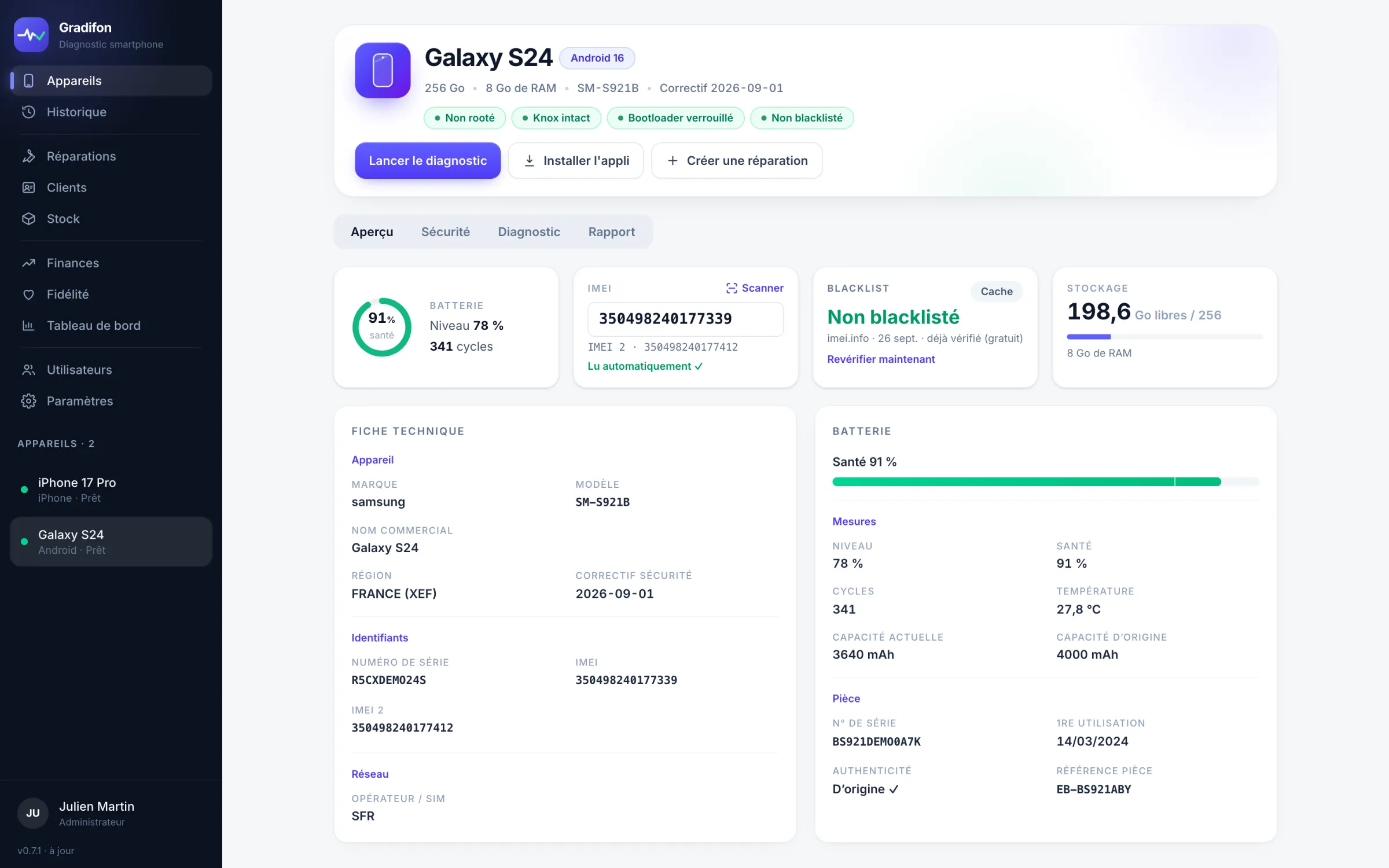
Gradifon Overview tab: identity, battery, IMEI, blacklist and storage of a Galaxy S24 (sample data)
iPhone and iPad

An iPhone can be read by cable too.

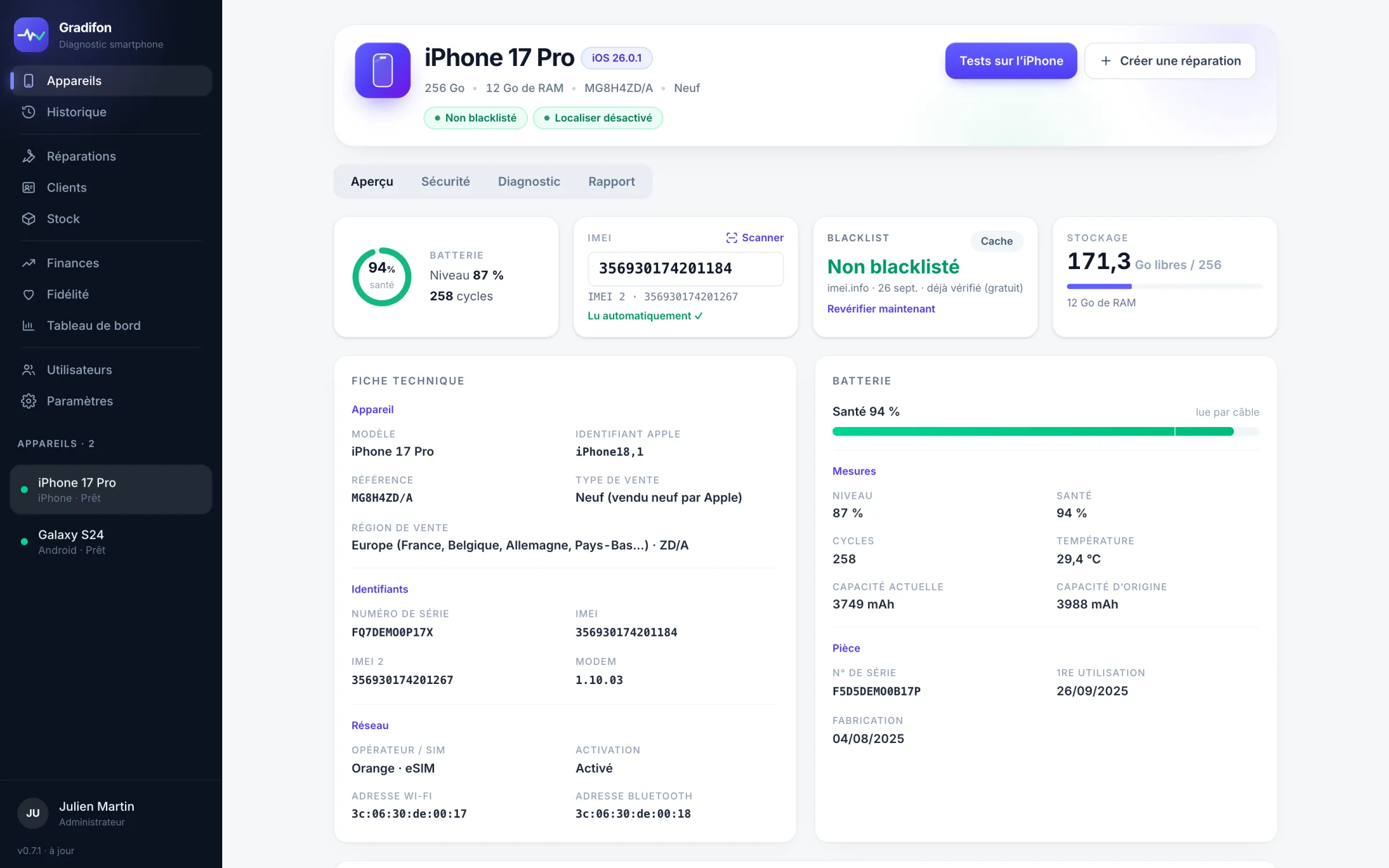
Unlock the iPhone and tap “Trust”: the record fills in with nothing to install (iOS 15.5 and later). Tests are run in the Gradifon app for iPhone (iOS 16.4 and later, on the App Store), which shows the results directly on the iPhone. The same app is available as an iPad version.

  • Model, iOS version, IMEI and IMEI 2, storage, RAM, Apple battery health and cycles
  • Apple reference and sale type (new, refurbished by Apple, replacement, demo), sales region, carrier, modem version
  • Find My, supervision, activation and remote management (MDM): a company iPhone is flagged
  • Replaced parts (battery, screen, Face ID) when this can be checked; otherwise nothing is claimed
  • iPad recognized by name, with its RAM; on a Wi-Fi model, the record says it has no IMEI, and Find My is still checked
  • Setup at the “Hello” screen: activation, language, the shop’s Wi-Fi, setup screens skipped; an iPhone locked to its previous owner’s account stays locked
  • On a Mac, restore of an “unavailable” iPhone or one in recovery mode, with the customer’s consent: the system is downloaded from Apple and then kept on the workstation
Gradifon Overview tab: record of an iPhone 17 Pro read by cable (battery, IMEI, Apple reference, sale type, Find My) — sample data
Security and integrity

Every lock explained in one line.

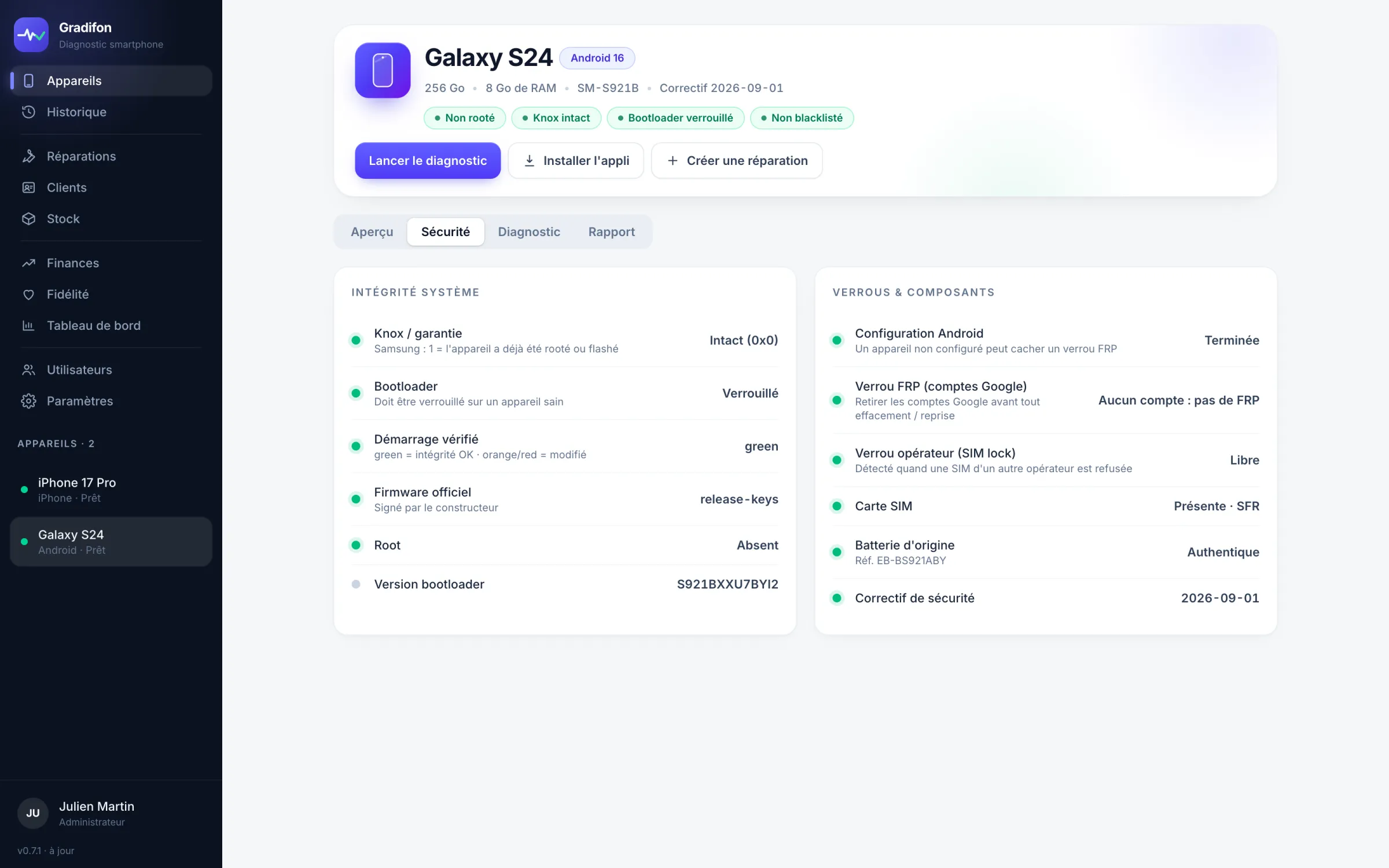
The Security tab reads what the manufacturer exposes: Knox and warranty, bootloader, verified boot, official firmware, root, Android setup and FRP lock, carrier lock, SIM card, original battery. When a value isn’t exposed, it says so plainly.

  • A tripped Knox, an unlocked bootloader or root cap the grade at C
  • Device not set up: flagged so you can check the FRP lock before any trade-in
  • Bootloader version and security patch, to compare with the manufacturer
Gradifon Security tab: system integrity and locks of a Galaxy S24, all green (sample data)
Battery

Battery health, in one ring.

Level, temperature, full-charge capacity against original capacity, cycle count and battery authenticity, when the manufacturer exposes them. Otherwise, Gradifon says so rather than inventing a value.

  • Health as a percentage, calculated from the actual capacities
  • Non-original battery flagged and taken into account in the grade
  • Charging port: validated automatically when the app was installed through the PC cable and the phone charges; with no PC, unplug and plug back in
Example · battery health
Full charge4,550 mAh
Original capacity5,000 mAh
Cycles212
Temperature28,4 °C
AuthenticityOriginal ✓
IMEI blacklist

Check before you take payment.

One click queries a worldwide database of phones reported lost or stolen to carriers and the police. The result appears in the record and on the certificate. Your plan includes checks every month (10, 30 or 100); beyond that, each one uses a credit. An IMEI your shop has already checked in the last 72 hours doesn’t count.

  • Clear status: not blacklisted, blacklisted, or check not possible
  • The date of the check stays on the record and on the certificate
  • Nothing is used without your say-so; the monthly count is visible in the sidebar
  • A blacklisted IMEI forces grade D
Example · blacklist
Blacklisted
Date14/07/2026
This month12 of 30 included
Grade and trade-in

A justified grade, a consistent estimate.

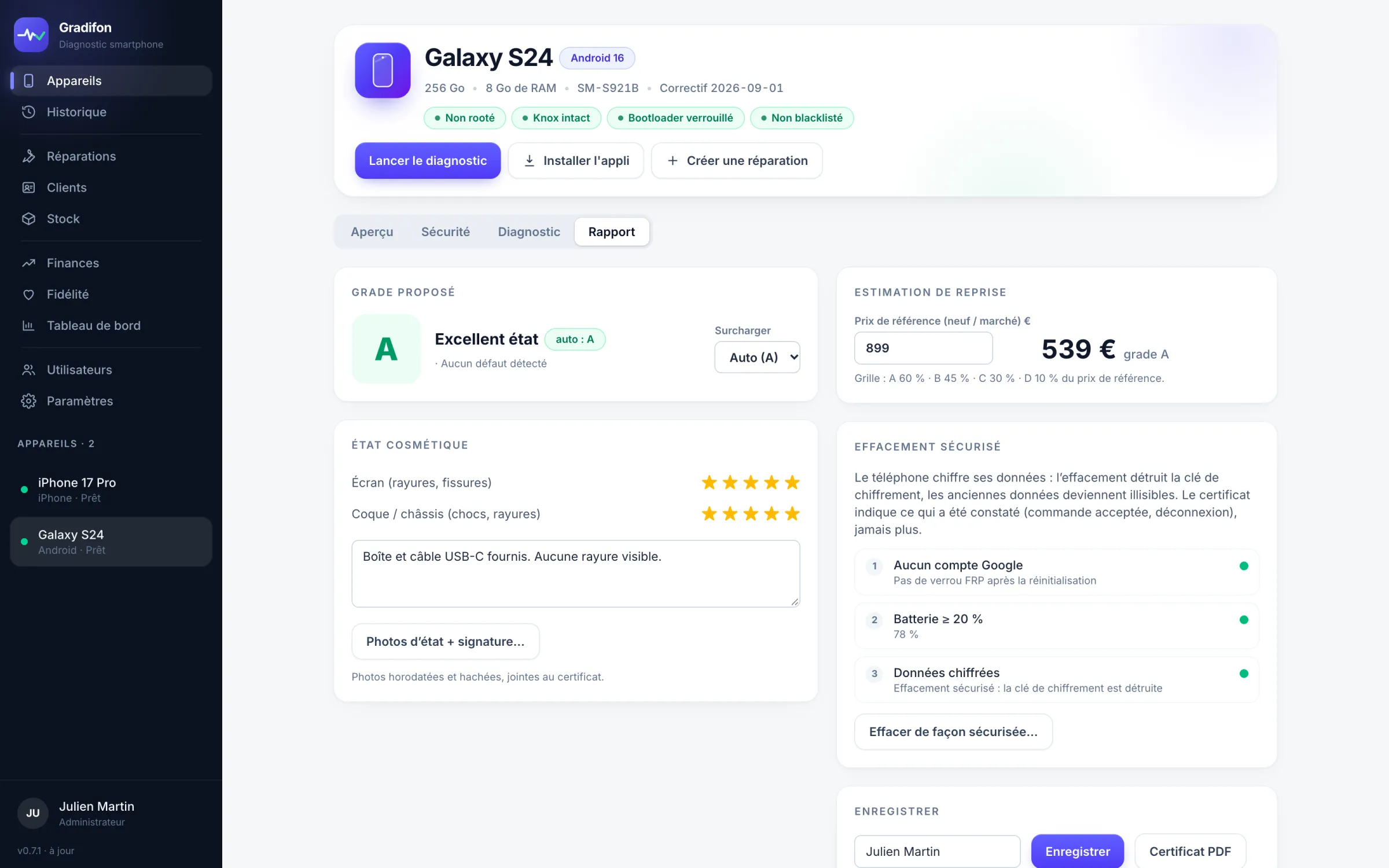
Grade A to D is suggested from the tests, the battery, the locks, the blacklist and the cosmetic rating of screen and casing. The reasons are listed; the technician can change it.

  • Core functions (screen, touch, cameras, audio, charging, buttons): one failure caps the grade at C, two at D
  • Battery under 80% caps the grade at B, under 70% at C; a tripped Knox, an unlocked bootloader or root cap it at C
  • Trade-in estimate = reference price × grade rate, editable grid
  • Grade, notes and technician’s signature on the certificate; the grade can still be changed
Gradifon Report tab: grade A suggested with override possible, trade-in estimate and cosmetic condition
Secure erase

Erase before you resell, without missing a step.

Erasure is started from the software, on Android and iPhone alike. Gradifon first checks what would make a resale fail, then records the result and adds it to the report.

  • Before: Google account or Find My signed out, no remote management (MDM), enough battery, encrypted storage
  • During: conditions checked again just before erasing, explicit confirmation from the technician
  • After: dated record added to the report (on iPhone, back to the setup screen)
Before erasing 4 / 4 conditions
  • Google account or Find MySigned out
  • Remote management (MDM)None
  • Battery64 %
  • StorageEncrypted
Erase phone
Result
Phone back at the setup screen at 14:32 · added to the report
Documents and tracking

Certificate, tickets, history, dashboard.

Everything that comes out of a diagnostic stays on the workstation, in a local database: only the blacklist check, the account sign-in and the certificates you choose to publish go over the Internet.

  • A4 PDF certificate: your shop’s header, technician, device, IMEI, battery, blacklist, test table, replaced parts, photos, signature, notes, grade
  • Online certificate viewable by QR code, only if you publish it (IMEI masked, no customer data), removable at any time
  • Certificate link emailed to the customer, in your shop’s name
  • On the certificate page, the buyer confirms it belongs to their phone by entering the IMEI shown by *#06#
  • Repair created from the connected device, with the diagnostic report attached (see the workshop below)
  • History filterable by IMEI, model or date, exportable to CSV (Excel); labels printed for the device
  • Batches: group a buy-back or an incoming shipment, with a summary of grades and failures, CSV export, batch labels and adding to stock
  • Dashboard: diagnostics, open tickets, tests per diagnostic, share of grade A, failure rate by component, and the workshop figures in the Finances tab
  • User accounts with two-factor authentication, a tamper-proof admin log, automatic updates on Windows and on Mac; workstation log to attach when there is a problem
Diagnostic certificate PDF · online via QR
A
Samsung Galaxy A17
24 tests · battery 91% · not blacklisted · IMEI masked
History CSV export
  • iPhone 13 · 30/09grade B · écran remplacéB
  • Galaxy A17 · 29/09grade A · effacéA
  • Pixel 7 · 28/09grade C · batterie 76 %C
Workshop

The workshop, from drop-off to delivery.

Workshop data is online, on servers located in the European Union, and shared across all your shop’s workstations. Each shop sees only its own.

Repairs and customers

One record per repair, one history per customer.

Create a repair from the connected phone or by hand: brand, model, IMEI, fault, condition on receipt, agreed price, location in the workshop.

  • Model suggested by brand, with its release year (for Apple, “15” suggests iPhone 15, 15 Plus, 15 Pro and 15 Pro Max); a model that isn’t listed is saved as you typed it
  • Jobs suggested by fault (broken screen: screen replacement, tempered glass fitted), added in one click, free text
  • Quality of the part fitted: original, compatible, refurbished… and your shop’s own list (Soft OLED, Hard OLED, Incell…), the same on all your workstations
  • Statuses: pending, in progress, completed, delivered, not repaired, canceled; one color per status, “For N days” in orange after more than 7 days of waiting
  • Customers as cards: number of repairs, amount, last visit; customer record with all their repairs
  • Drop-off receipt signed by the customer on screen, as a PDF or by email
Watch the Repairs tab video
Repairs 3 repairs
R-0145 · Galaxy S23
Sofia M. · battery
Pending
for 9 days
79,00 €
R-0144 · iPhone 14
Karim B. · broken screen
In progress189,00 €
R-0142 · iPhone 13
Léa D. · screen
Completed149,00 €
Drop-off receipt · R-0144
Signed by Karim B. on 30/09 at 10:12
Stock

All your stock in order, with your prices and your margin.

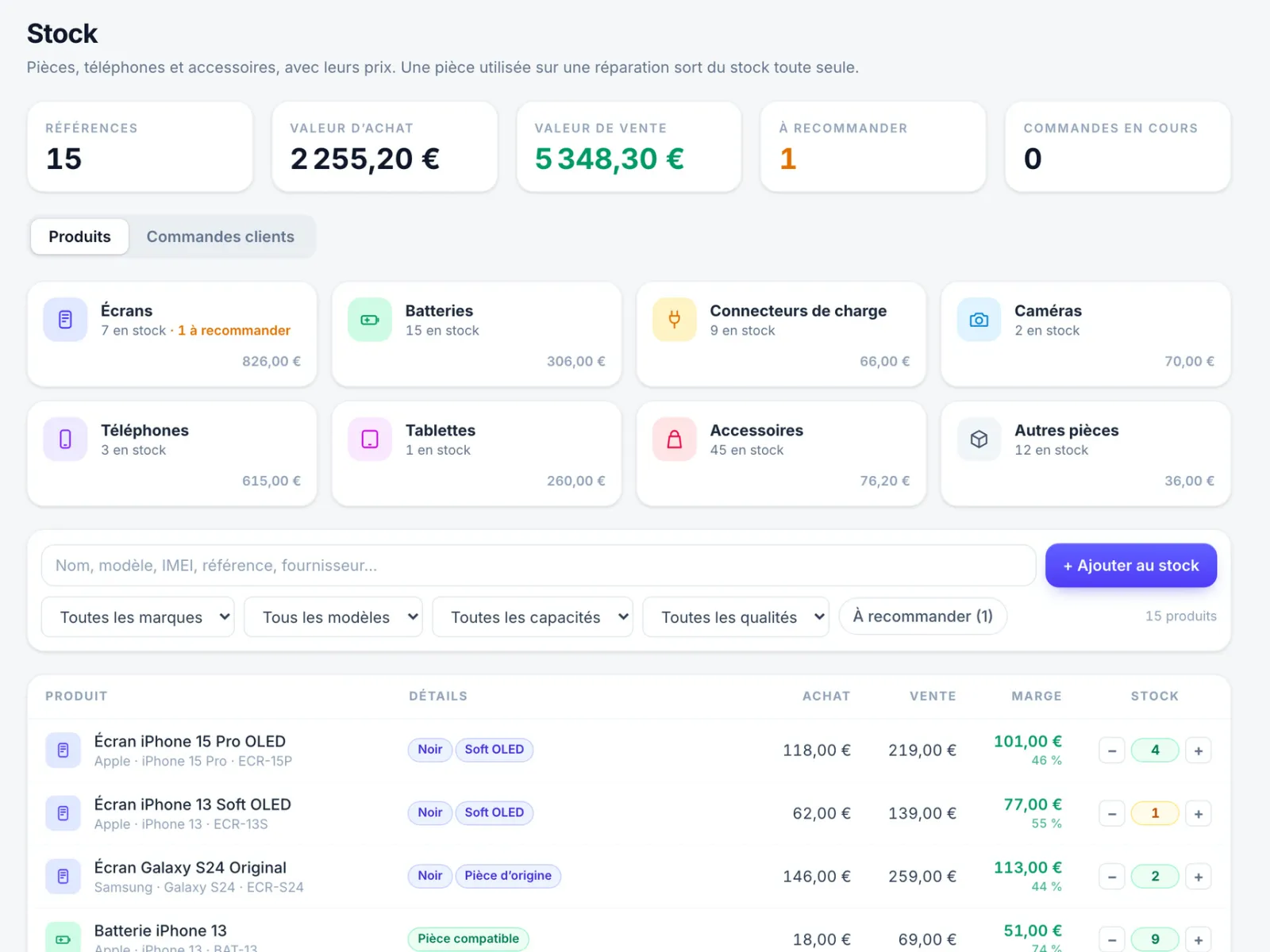
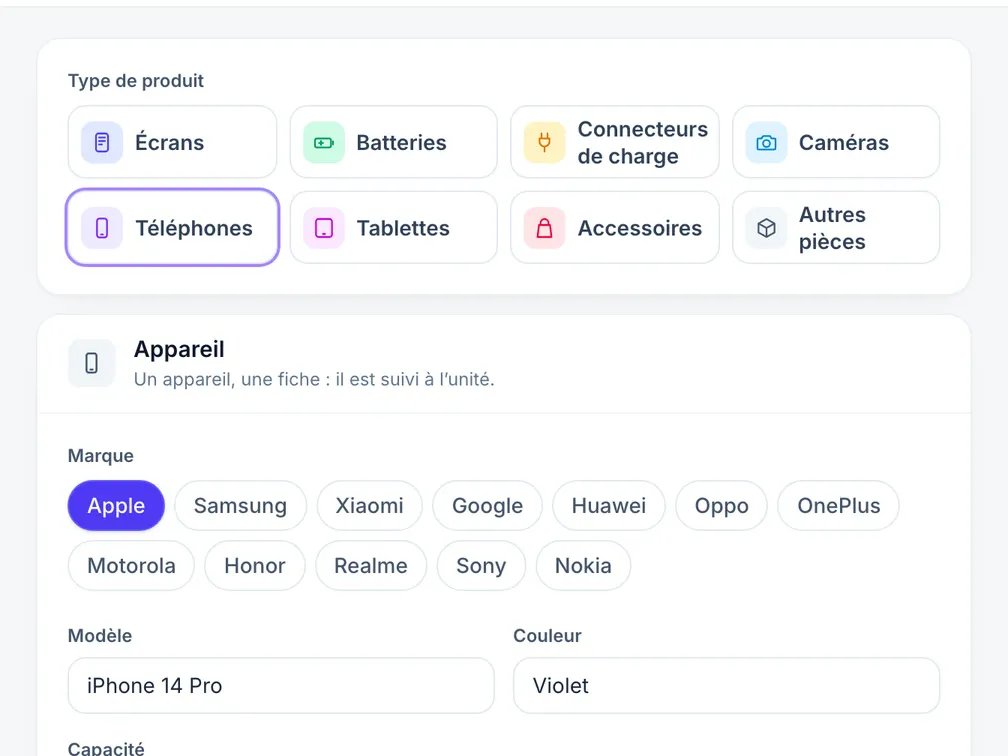
Open the tab and you see eight color-coded categories: screens, batteries, charging connectors, cameras, phones, tablets, accessories and other parts. Each one shows what you have in stock and what it’s worth. Click a category and the list shows only that one.

  • Purchase and sale price for each product, with the margin calculated automatically, in euros and as a percentage
  • Purchase value and sale value of the stock, products to reorder
  • Filters by brand, model, capacity and quality; search also finds an IMEI, a reference or a supplier
  • A part added to a repair leaves stock automatically, and the repair’s margin is calculated: agreed price − discount − cost of parts
  • Parts not in stock can be added for a one-off purchase; orders for a customer: pending, received, converted to a repair
Watch the Stock tab video
Gradifon Stock tab: purchase and sale value, eight color-coded categories, filters and product list with their margin (sample data)
Product record

The record adapts to what you add.

You choose the product type, and Gradifon only asks for what applies to it. The name fills in by itself from what you enter.

  • Phone or tablet: capacity, color, condition and IMEI, tracked unit by unit
  • Part: quality, quantity and stock alert threshold
  • IMEI checked on entry, duplicate flagged; a Wi-Fi tablet needs no IMEI
  • Parts already entered are sorted automatically into categories based on their name
Gradifon stock entry form for a phone: brand, model, color, capacity, condition and IMEI (sample data)
From batch to stock

An incoming shipment goes into stock in one click.

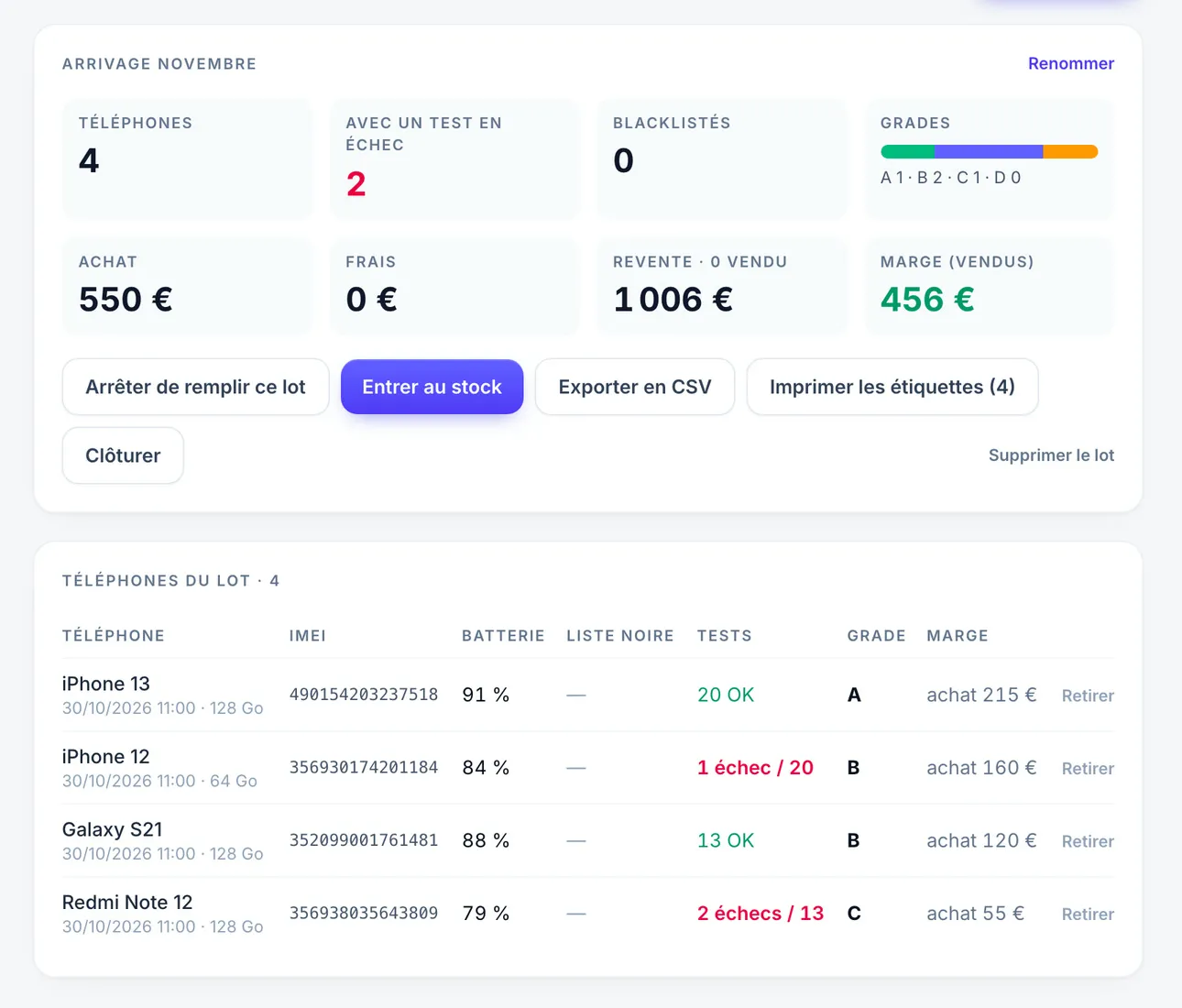
Have you diagnosed a buy-back or an incoming shipment in a batch? The “Add to stock” button creates the record for each phone, with nothing to retype.

  • Price, grade, IMEI and capacity carried over from the batch, with the batch name on the record
  • Blacklisted phones left out
  • A phone already in stock with the same IMEI isn’t created again
  • The batch keeps its summary: grades, failures, purchase, resale and margin
Gradifon Batches screen: summary of an incoming shipment of four phones with the Add to stock button (sample data)
Dashboard · Finances

What the workshop really earns.

The workshop figures are in the Finances tab of the Dashboard. They come from delivered repairs: agreed price minus the loyalty discount, cost of the parts used, margin.

  • Periods: today, week, month, 30 days, 3 months, year or dates of your choice
  • Delivered revenue, cost of parts, margin and margin rate, average ticket
  • Revenue and margin curve
  • List of delivered repairs with their margin
Delivered revenue
3 319,00 €
this month
Margin
2 212,60 €
67% · average ticket €123
Delivered revenue and margin Delivered revenueMargin
Loyalty

A credit that brings customers back.

Set your rule, “€X credit for every €Y of delivered repairs”: the customer earns credit automatically when a repair with a customer record becomes “Delivered”. You can also give some from their record (loyal customer, goodwill gesture). They use it as a discount on a repair, and the discount appears on the invoice.

  • Credit earned on delivery, taken back if the repair goes back to another status
  • Credit added by hand, with the reason kept
  • Discount limited to the customer’s credit and the balance still to pay
  • Discount can be canceled until the invoice is issued
  • Movement history that cannot be edited
Program rule enabled
€5 of credit for every €100 of repairs delivered
Customers credit
  • Sofia M.earned on delivery of R-00985,00 €
  • Karim B.goodwill gesture10,00 €
Emails to customers

The customer informed, in your shop’s name.

Three emails go out from Gradifon in your shop’s name: the link to a phone’s certificate, “Your repair is ready” and the signed drop-off receipt, as an attachment.

  • Text written by Gradifon from the repair record or the certificate
  • Each send asks for a confirmation that shows the address
  • Repair ready and drop-off receipt: address taken from the customer record; the receipt is only sent if it has been signed
  • Customer replies arrive at the address set for your shop
Send an email R-0142
  • FromBoutique SM
  • Àlea.d@example.com
  • SubjectYour repair is ready
Confirm sending
Sent
iPhone 13 · écran · prête à être retirée
Invoices

Invoices from the repair, in one click.

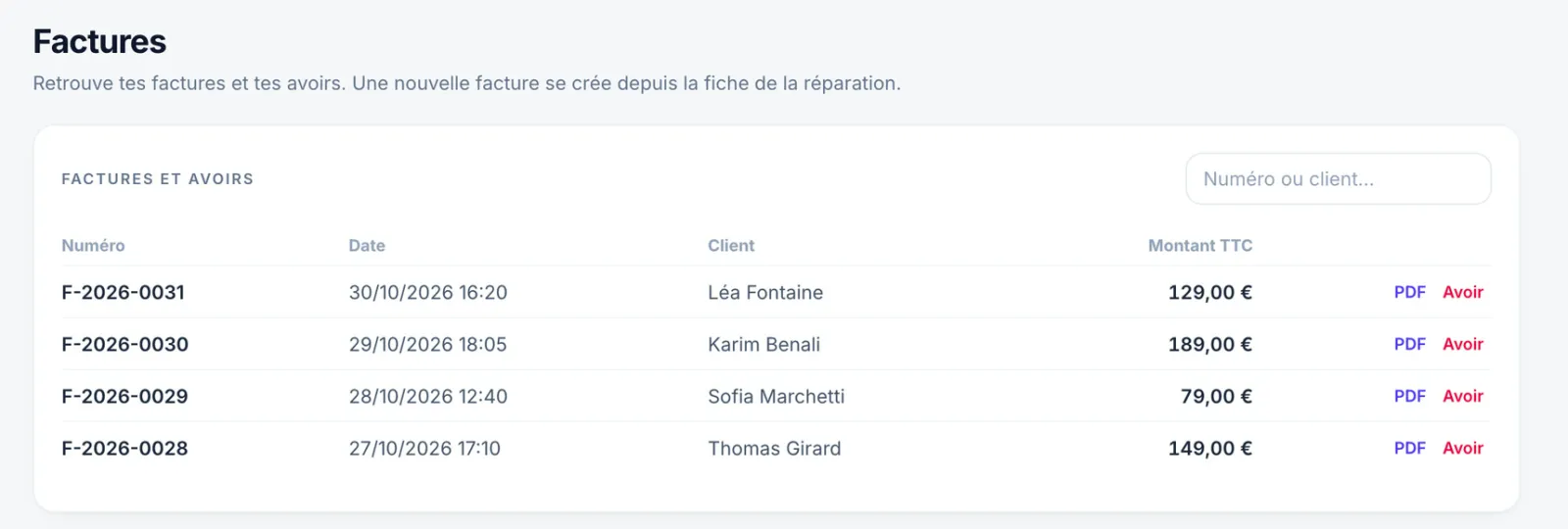
The invoice is prepared from the repair: lines, loyalty discount, shop identity. An issued invoice can no longer be edited; a mistake is corrected with a credit note. All your invoices and credit notes are then found in their own tab.

Gradifon Invoices tab: list of invoices with search by number or customer, PDF and credit note (sample data)
Invoices and credit notes

Numbered, with the shop’s identity

  • The shop’s legal identity and SIRET
  • Prices excl. VAT and VAT, or “VAT not applicable, art. 293 B of the French General Tax Code (CGI)”
  • B2B details for a business customer
Drop-off receipt

Signed on screen, handed over as a PDF

  • Device, condition, fault, price
  • Customer’s signature on the workstation
  • Loyalty discount and net amount to pay
  • Emailed to the customer once signed
Traceability

Nothing is changed on the quiet

  • Invoices and credit notes chained together, unalterable
  • Search by number or by customer in the Invoices tab
  • Reprint marked “duplicate” and tracked
  • PDF to hand over or send to the customer
Test app

The 24 tests, in the order the technician runs them.

On Android, the app installs itself from the PC over USB, updates with the software, and each result comes back to the PC live. On iPhone and iPad, tests are run in the Gradifon app, on the App Store. Two test sequences: “Counter” (13 tests, about 2 minutes) and “Full” (all 24, about 6 minutes). A test the model can’t perform, such as a lens the phone doesn’t have or a vibration motor on an iPad, is marked “not supported” and never counted as a failure.

Interactive
the technician confirms (sound heard, clear photo, vibration felt…)
Auto
measured by the phone, with no intervention
  1. Color screensDead pixels, marks, uniformity
    Interactive
  2. Touch gridEvery area of the screen responds
    Interactive
  3. Multi-touchTwo fingers at the same time
    Interactive
  4. ButtonsVolume, power, silent
    Interactive
  5. Main speakerSound played, confirmed by ear
    Interactive
  6. EarpieceSound in the call earpiece
    Interactive
  7. Microphone3 s recording, then playback
    Interactive
  8. Main rear cameraPhoto shown for checking
    Interactive
  9. Wide-angle rear cameraPhoto through this lens, if there is one
    Interactive
  10. Telephoto rear cameraPhoto through this lens, if there is one
    Interactive
  11. Front cameraPhoto shown for checking
    Interactive
  12. Flash / torchLED lights up
    Interactive
  13. Vibration motorOne-second vibration
    Interactive
  14. AccelerometerMovement detected when shaken
    Auto
  15. GyroscopeRotation detected
    Auto
  16. Proximity sensorHand in front of the sensor
    Interactive
  17. Light sensorChange in light measured
    Auto
  18. GPSPosition obtained in under 30 s
    Auto
  19. Wi-FiModule present and active
    Auto
  20. BluetoothClassic and low energy
    Auto
  21. NFCChip present and active
    Auto
  22. BiometricsFingerprint or face
    Interactive
  23. Charging portCharging detected; validated automatically if the app was installed from the PC
    Interactive
  24. SIM detectionCard present, carrier read
    Auto

Want to see it running on your devices?

Download the software and request access: we approve it and create your account. Windows and Mac, Android and iPhone diagnostics, workshop and invoices included.