The device record fills itself in
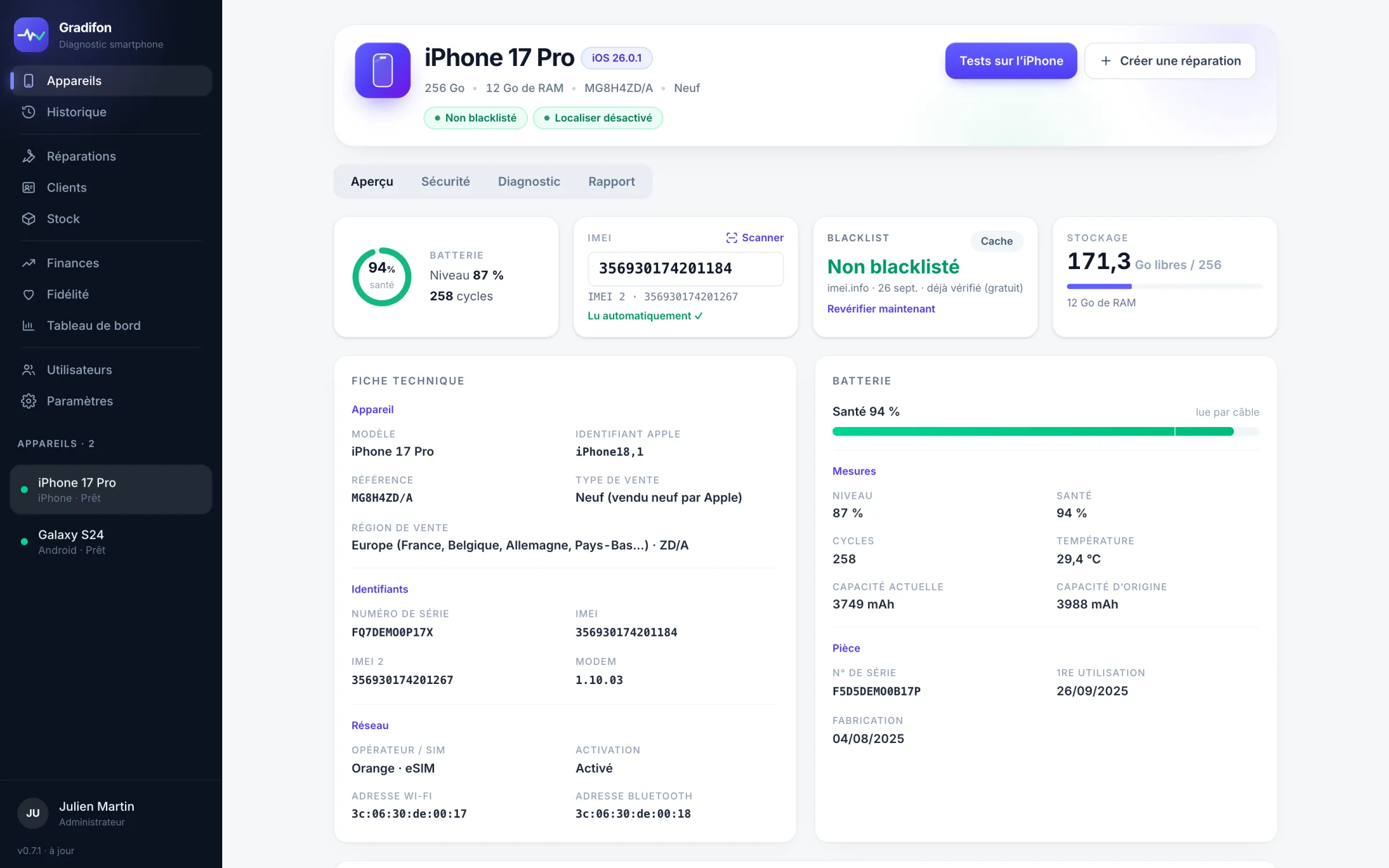
Model, system version, IMEI, battery health, storage, locks, and on iPhone the Apple reference number, the sales type and Find My: it’s all read over USB when you plug in.
Plug in an Android or iPhone by USB: IMEI, battery health, locks, guided tests, grade and PDF certificate in a few minutes. Then the whole workshop behind it: repairs, stock and invoices.
Free to download. The software opens with an account, created once your request is approved.
 A17

What a technician checks by hand before a trade-in, Gradifon reads, tests and documents. You keep the decision.
Model, system version, IMEI, battery health, storage, locks, and on iPhone the Apple reference number, the sales type and Find My: it’s all read over USB when you plug in.
Blacklist checked live (worldwide database of lost or stolen phones), battery or parts replaced when it can be verified, bootloader unlocked, remote management (MDM): it all shows up before you take payment.
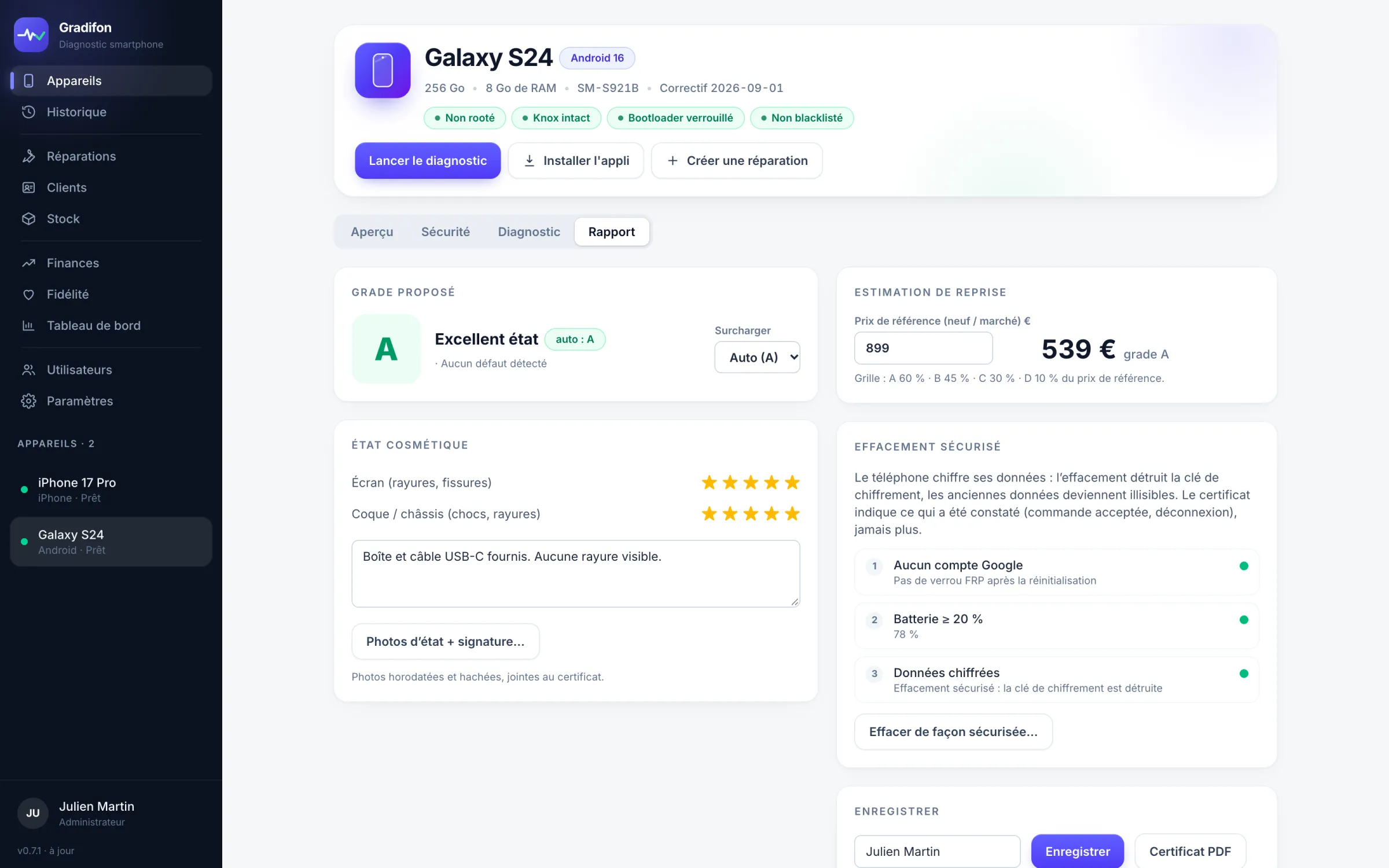
Grade A to D suggested with its reasons, trade-in estimate based on your grid, PDF certificate handed to the customer and receipt with a QR label. Online, the buyer confirms the certificate really is the one for their phone.
Screenshots of the Gradifon interface. The iPhone 17 Pro, the Galaxy S24, the customers and the figures are examples.
The diagnosed phone becomes a repair: customer, signed drop-off receipt, parts, invoice. Workshop data is online and shared across all the workstations in the shop.
| N° | Customer · device | Status | Price |
|---|---|---|---|
| R-0145 | Sofia M. · Galaxy S23 · battery | Pending for 9 days | 79,00 € |
| R-0144 | Karim B. · iPhone 14 · broken screen | In progress for 2 days | 189,00 € |
| R-0142 | Léa D. · iPhone 13 · screen | Completed | 149,00 € |
| R-0139 | Hugo P. · iPhone 11 · connector | Delivered | 89,00 € |
Sample data. Repairs, Customers, Loyalty and Dashboard are clickable.
Model suggested by brand, jobs suggested by fault, quality of the part fitted. Statuses from drop-off to delivery, customer record with its history.
Purchase prices, reorder alerts, part orders for a customer. The margin on each repair is calculated.
Certificate link, “Your repair is ready”, signed drop-off receipt attached. The address is confirmed before anything is sent.
Drop-off receipt signed by the customer on screen. Numbered invoices and credit notes, with the shop’s legal identity, as PDF.
Diagnostic activity and repairs by status. In the Finances tab: revenue from delivered repairs, parts cost, margin and average ticket, over the period of your choice.
Credit earned on delivery under your rule, or given from the customer’s record. It’s used as a discount on a repair and appears on the invoice.
Nothing to install except Gradifon: the USB tool, the Android test app and the local database are built in.
Android with USB debugging, or iPhone after “Trust”: Gradifon detects the device and fills in the record (identity, battery, locks, IMEI).
One click queries a worldwide database of phones reported lost or stolen. The status and date appear in the device record.
On Android, the test app installs and opens by itself, and results arrive live on your computer. On iPhone, the tests run in the Gradifon app for iPhone, from the App Store.
Cosmetic score, grade suggested and justified, trade-in estimate. PDF certificate, receipt and QR label in one click.
The worst criterion wins and Gradifon tells you which: essential function failing, worn battery, Knox tripped, broken screen. You can change the grade, add your notes and sign the certificate with your own name.
Gradifon was designed at the counter of a repair shop, for its own trade-ins. It’s made for people who handle used phones all day.
Condition check at intake, signed drop-off receipt, parts taken from stock, invoice. No more disputes over “it worked before”.
Several phones plugged in at once, batches with their labels, the same grade from one technician to the next and failure rates by component.
A buying decision made with the facts: blacklist, battery and locks checked, consistent estimate, secure erase before resale.
Newest first. Workstations already installed, Windows and Mac, update themselves.
A customer drops off three phones: one job sheet groups them. Each keeps its own number, status and price, and the drop-off receipt lists them all with the total. A dedicated field holds the unlock code, Android pattern included, hidden and erased when the phone is handed back.
On top of the statuses, track your workshop’s steps: quote ready, part ordered, part arrived, to call back… A drop-down menu on every job sheet and a filter in the list. The ones you choose appear in the online tracking on your website; “Red ticket” stays in the workshop.
Customer name, reference, device, price and date, with a barcode or a QR code, your choice. The scanner reads the label and opens the job sheet. Dymo 11356 and 30321 formats added, always printed at the printer’s best quality.
Eight color-coded categories, from screen to phone. Purchase and sale prices, margin worked out automatically, filters by brand, model, capacity and quality. The product record adapts to the item, with the IMEI for a phone.
Each phone in the batch gets its own record, with its prices, grade and IMEI. Blacklisted phones are set aside, and a phone already in stock with the same IMEI isn’t created again.
Invoices and credit notes in one place, with search by number or by customer, the PDF duplicate and the credit note. A new invoice is always created from the repair record.
Gradifon only opens with an account. Each account is created by hand, once the request is approved. No automatic sign-up.
Windows or Mac, two minutes. Without an account, the software stops at the sign-in screen.
FreeA form: your name, your shop, your contact details. The request comes straight to us.
Two minutesIf your business is a fit, we create your account and send you your login details, usually within one business day.
On approvalOn Android, no: the test app is built into Gradifon and installs itself over USB at the first diagnostic, you just need to turn on USB debugging. On iPhone, the device record is read by cable with nothing to install; the tests run in the Gradifon app for iPhone (on the App Store), which shows the results on the iPhone.
Android 7.0 and later, all brands. iPhone: device record by cable from iOS 15.5, tests from iOS 16.4. Some information depends on the manufacturer (cycles, battery health, original parts): when it isn’t exposed, Gradifon says so rather than inventing a value.
Allow one business day. We read your request, create your account and send you your login details by email or phone. In the meantime, you can already install the software.
To sign in to the account, check an IMEI and use the workshop (repairs, stock, invoices), yes: that data is shared between workstations. Diagnostics, tests, certificates and history work offline, with 72 hours of tolerance without a network once signed in.
Diagnostics, photos and history stay on the workstation, in a local database. Workshop data (customers, repairs, stock, invoices) is online, on servers located in the European Union (Paris), and visible only to your shop’s accounts. Details in the legal notice.
Because the Windows installer isn’t yet signed with a commercial certificate: SmartScreen warns you the first time you run it, just once (see the installation notes). On Mac, no warning: the application is signed and approved by Apple.
Leave your details. We approve your request, create your account and get back to you with your login details.